Summarize anything with Peek
Get the gist of any article, photo, PDF, or pasted note — using AI that runs entirely on your iPhone.
Free for 3 summaries a month · Pro $25/year · No account required
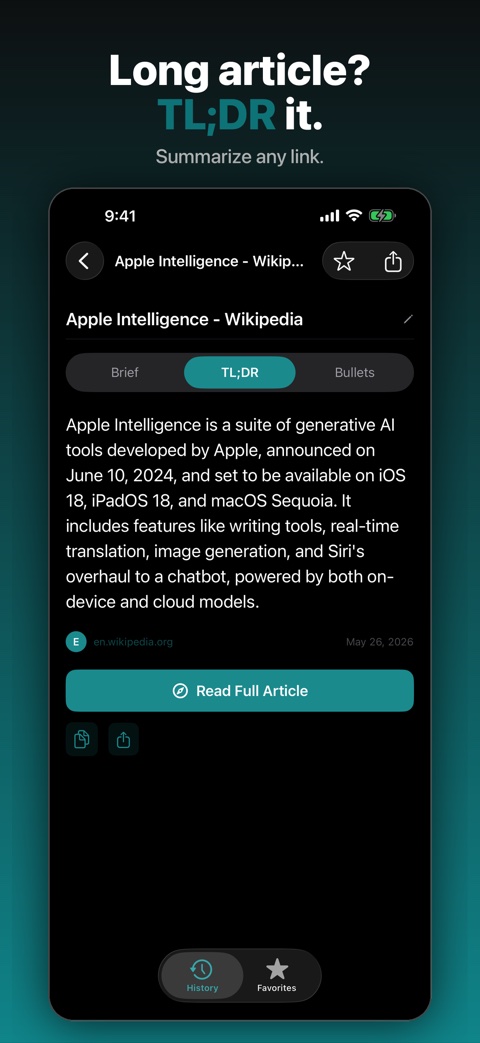
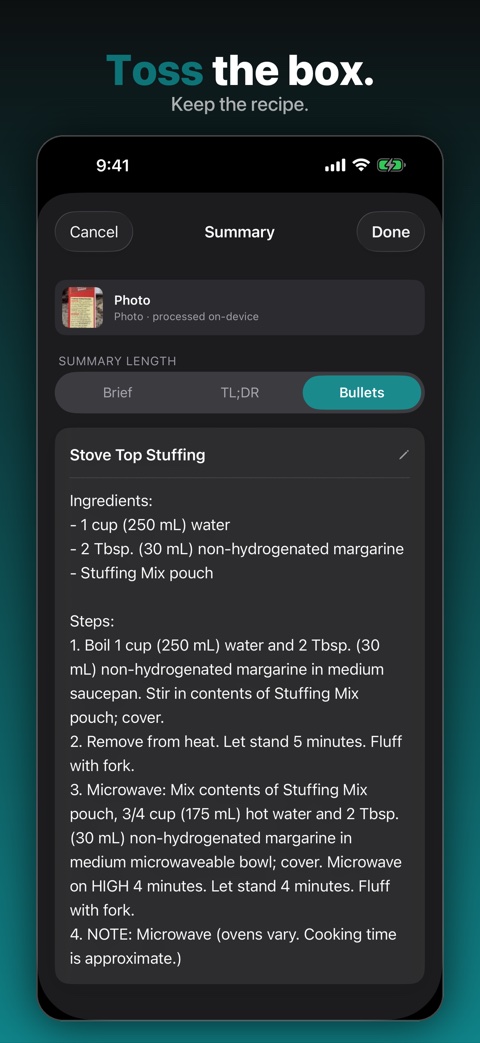
Powered by Apple Intelligence — your content never leaves the device.
Five ways to summarize
One private summarizer, wired into all the places you actually read things.
Articles & links
Share a link from Safari, News, or any app.
Photos
Snap a recipe, sign, receipt, or document.
PDFs
Open one from Files, email, or anywhere.
Text & notes
Paste an article or notes you've copied.
Highlight
Select text in any app, tap Share → Peek.
Three summary styles
Pick how much you want back — every source is summarized in all three, cached on your device.
Brief
One sentence. Just enough to know what's there.
TL;DR
A quick paragraph. The gist in plain English.
Bullets
The key points, in order, so you can scan and act.
Your content stays on your device. Period.
Peek runs Apple's Foundation Models locally on your iPhone. The page you summarize, the photo you scan, the text you paste — none of it leaves the device.
On-device AI
Apple Intelligence does the work on the Neural Engine. No servers, and summarization even works offline.
No accounts, no tracking
No sign-up, no login, no ads, and no analytics SDKs inside the app. Open it and go.
Local history
Your summaries and favourites are stored only on your iPhone — never synced to a cloud we can see.
The full details, in plain language: Privacy Policy.
Free to try. One small price to go unlimited.
Every style and every input type is included in the free tier — Pro just removes the limits.
Free
- 3 summaries per month
- All summary styles
- All five input types
- Summary history (up to 3)
Peek Pro
- Unlimited summaries
- Full history
- Favourites and deletion
- Supports independent development
Prices shown in USD — the App Store charges the equivalent in your local currency.
Frequently asked questions
The questions people ask before their first on-device summary.
Is there an on-device AI summarizer for iPhone?
Yes. Peek is an iOS app that summarizes web pages, photos, PDFs, pasted text, and highlighted selections entirely on your iPhone using Apple Intelligence Foundation Models. No content, URLs, images, or summaries are sent to any server — everything is processed locally on the device.
Which iPhones support Peek?
Peek requires Apple Intelligence, which runs on iPhone 15 Pro, iPhone 15 Pro Max, and all iPhone 16 and iPhone 17 models. You also need iOS 26 or later with Apple Intelligence enabled in Settings.
What can Peek summarize?
Peek summarizes five input types: web pages (shared from any app or pasted as URLs), photos containing text (recipes, signs, receipts, documents), PDFs (opened from Files, email, or anywhere), text you paste, and text you highlight in any app using the Share Sheet. All processing happens on-device.
How is Peek different from Safari Reader summaries?
Safari Reader produces a single two- to three-sentence summary only inside Safari, and only for web pages. Peek works from any app via the iOS Share Sheet, handles five different input types (links, photos, PDFs, pasted text, highlighted selections), offers three summary styles (Brief, TLDR, Bullets), keeps a searchable history, and lets you star favourites.
Does Peek work offline?
The summarization itself runs fully offline on the Apple Neural Engine. Peek only needs an internet connection to fetch a web page you've asked it to summarize. Summarizing a photo, PDF, or pasted text works completely offline.
Does Peek send my data anywhere?
Your content stays on your iPhone — the URLs you summarize, the photos you scan, the PDFs you open, and the text you paste never leave the device. The Peek iOS app does not include third-party analytics SDKs or behavioral tracking. The only data the app transmits is anonymous subscription status (via RevenueCat for Pro users) and, for users who install Peek via an Apple Search Ads campaign, a one-time first-party install attribution token sent to Apple at launch. The peek.3paws.ai marketing website uses Umami for privacy-respecting visitor analytics — no cookies, no IP storage, no personal data.
How much does Peek cost?
Peek is free for up to 3 summaries per month with a history of 3. Peek Pro is $25 per year (or about $2 per week) for unlimited summaries, full history, and favourites.
Can I summarize articles from apps other than Safari?
Yes. Peek registers with the iOS Share Sheet, so you can share a link from any app — X, Reddit, email, Messages, RSS readers — and get a summary instantly. You can also paste a URL directly into Peek.